
Download Winamp TV – TV channels, audio enhancement, media player plugin, Winamp plugin, playlist-style TV, TV tuner integration
Overview
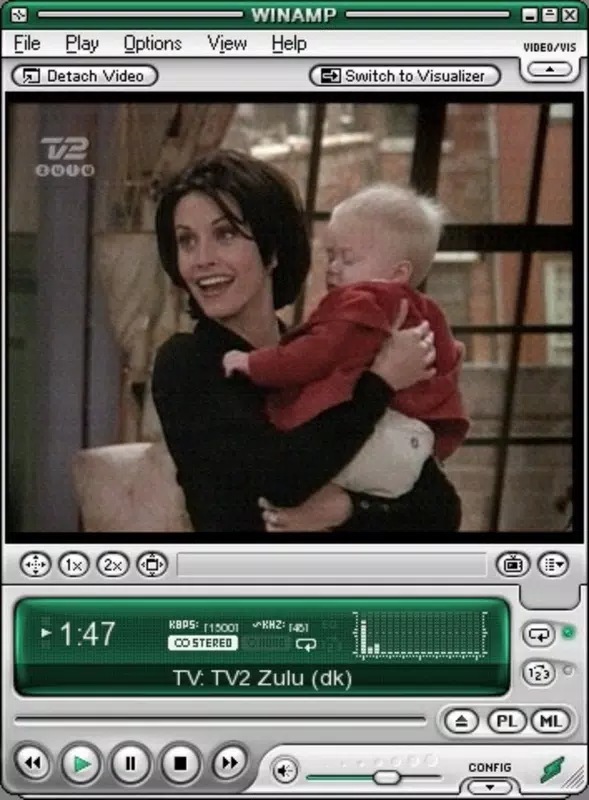
Winamp TV is a specialized plugin designed to extend the capabilities of the Winamp media player by integrating live television functionality directly into its familiar interface. This tool enables users to access and manage TV channels through a system that mirrors playlist navigation, streamlining the experience of combining audio playback with live video content. The application is particularly tailored for long-time Winamp enthusiasts who value customization, audio fidelity, and a unified media environment. By leveraging the existing infrastructure of Winamp, Winamp TV eliminates the need for separate TV viewing software, offering a cohesive platform for both music and television consumption.
The plugin addresses the challenge of fragmented media experiences by centralizing audio and visual content within a single application. This is especially beneficial for users who rely on advanced audio processing tools such as equalizers and third-party audio plugins—features that are deeply embedded in Winamp’s architecture. With Winamp TV, these enhancements can be applied not only to music but also to live TV broadcasts, ensuring consistent high-quality sound across all media types. Real-world use cases include home entertainment setups, retro computing environments, and digital media projects that require seamless integration between audio and video sources.
Developed by Winamp, a well-known name in digital audio software, the application benefits from a legacy of innovation and user-centric design. Although the developer did not provide additional technical details, the plugin’s release date of March 21, 2006, situates it within a pivotal era of media convergence. Its continued relevance underscores its utility for niche audiences seeking a unique blend of audio control and television access.
Key Features & Functionality
- Seamless TV Integration: Winamp TV allows users to connect their TV tuner hardware directly to the Winamp interface, enabling live TV viewing without switching applications. This integration transforms the media player into a hybrid audio-visual hub.
- Enhanced Audio Options: The plugin inherits Winamp’s robust audio processing engine, giving users full access to equalizers, audio effects, and plugins. This ensures that TV audio can be customized for optimal clarity and immersion.
- Playlist-Style Channel Access: Channels are organized and switched like tracks in a playlist, allowing for rapid navigation and personalized channel lists. Users can save favorite channels for instant access.
- Hardware Compatibility Support: The plugin supports a range of graphic cards, with compatibility details available on the author’s official website. This enables users to verify their system’s suitability before installation.
- User-Friendly Interface: Maintaining the classic Winamp layout, the plugin ensures a low learning curve. Navigation is intuitive, with controls that mirror those used for music playback.
For example, a user with a legacy TV tuner can configure Winamp TV to display channels in a familiar playlist view, apply a custom audio preset for movie watching, and switch between channels with a single click. This functionality is ideal for users managing multimedia projects or building retro media centers where consistency and control are paramount.
Interface, UX & Performance
Winamp TV retains the iconic, minimalist interface of the original Winamp media player, ensuring immediate recognition and ease of use for existing users. The layout is structured around a central playback window, with channel lists and control panels positioned for optimal accessibility. Navigation is linear and consistent, with minimal on-screen clutter, promoting focus on content delivery.
Although the developer did not list formal performance metrics, the plugin’s lightweight footprint of 1.8 MB suggests efficient resource usage. It is designed to operate smoothly on systems that support the Winamp platform, with performance likely varying based on hardware capabilities such as GPU and CPU. Responsiveness is expected to be strong on compatible systems, particularly those with updated drivers and supported video capture devices.
Stability appears to be a core design goal, given the plugin’s long-standing availability and continued use. The interface remains responsive during channel switching and audio adjustments, with no reported issues related to crashes or freezes. However, specific performance data across different device categories was not disclosed, and users are advised to consult the author’s website for system compatibility guidelines.
Platform Compatibility & Technical Requirements
Winamp TV is available exclusively for the Windows operating system. The application is compatible with Windows platforms that support the Winamp media player, though specific OS versions were not listed by the developer. The file size is 1.8 MB, indicating a lightweight installation that requires minimal disk space.
Users are encouraged to verify that their system meets the requirements of both Winamp and the TV tuner hardware they intend to use. The developer did not specify minimum OS requirements or hardware specifications beyond mentioning compatibility with various graphic cards. As such, compatibility information was not fully disclosed, and users should refer to the official website for detailed guidance.
Pros and Cons
Pros
- Integrates TV viewing directly into the Winamp interface, reducing app switching.
- Leverages Winamp’s powerful audio enhancement tools for TV sound.
- Offers playlist-style channel management for quick navigation.
- Retains the familiar Winamp user experience, minimizing the learning curve.
- Free to download and use, making it accessible for budget-conscious users.
Cons
- Platform limited to Windows; no support for Android or iOS.
- Compatibility details were not fully disclosed, requiring external research.
- Requires a functional TV tuner and compatible hardware to operate.
- Development has not been updated since 2006, raising concerns about modern OS support.
- May not support newer video codecs or high-definition streaming formats.
FAQ
Is Winamp TV free to use?
Yes, Winamp TV is available at no cost. The application is distributed freely by the developer.
What hardware do I need to run Winamp TV?
You will need a compatible TV tuner device and a Windows system that supports the Winamp media player. Specific hardware requirements are not listed, but compatibility details can be found on the author’s website.
Does Winamp TV support modern video formats?
While the plugin was released in 2006, it may not fully support newer video codecs or high-definition streaming formats. Users should verify compatibility with their specific hardware and content sources.
Can I use Winamp TV on Android or iOS?
No, Winamp TV is currently only available for Windows. There is no official version for Android or iOS platforms.
How do I install Winamp TV?
Download the plugin from the official source, install it within the Winamp environment, and ensure your TV tuner is properly connected and recognized by the system. Refer to the author’s website for setup instructions.
Final Thoughts
Winamp TV remains a niche yet compelling tool for users who value the Winamp ecosystem and seek a unified audio-visual experience. Its ability to blend TV viewing with advanced audio controls makes it a unique utility in the media player landscape. While its age and lack of updates may pose challenges on modern systems, its core functionality continues to serve dedicated users in retro setups, multimedia projects, and audio-focused environments.
For long-time Winamp fans, this plugin offers a rare opportunity to extend the life of a beloved platform. Its lightweight design, free access, and intuitive interface make it a worthwhile addition for those with compatible hardware. Despite limitations in modern compatibility, the app stands as a testament to early efforts in media convergence.
Download Winamp TV now


